

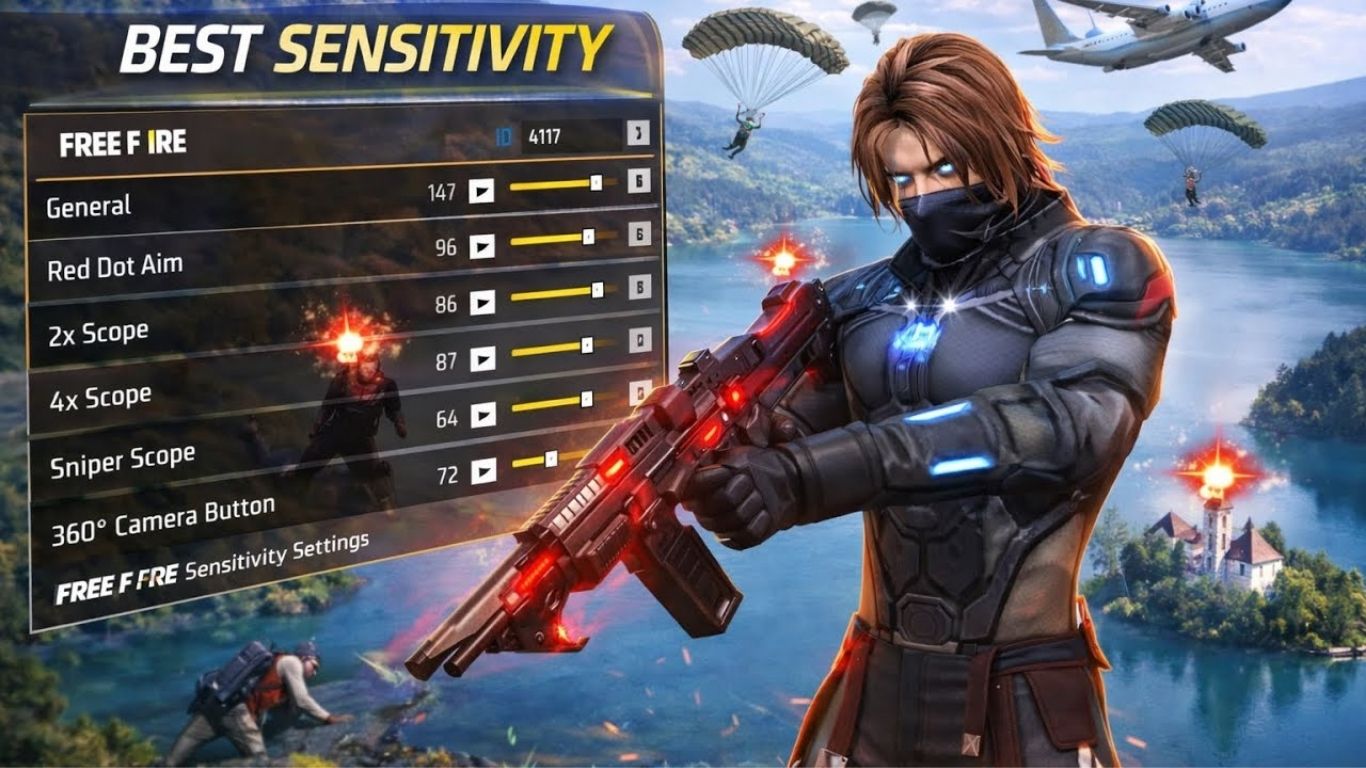
Free Fire MAX continúa siendo uno de los juegos Battle Royale móviles más jugados en 2026, donde la precisión, velocidad de reacción y control de armas son factores clave para ganar enfrentamientos. Uno de los elementos más importantes para mejorar el rendimiento dentro del juego es la configuración de sensibilidad. Los jugadores que buscan conseguir más disparos a la cabeza, mejorar el control del retroceso y dominar los combates necesitan encontrar una sensibilidad adecuada para su dispositivo y estilo de juego.
Los mejores ajustes de sensibilidad de Free Fire MAX 2026 ayudan a realizar movimientos más rápidos, mejorar la puntería y ejecutar técnicas como el drag headshot y el one tap headshot con mayor facilidad. Aunque muchos jugadores profesionales comparten sus configuraciones, cada usuario debe realizar pequeños ajustes dependiendo de su teléfono, tamaño de pantalla y comodidad al jugar.
¿Por Qué la Sensibilidad es Importante en Free Fire MAX?
La sensibilidad determina la rapidez con la que la cámara y la mira responden al movimiento de los dedos. Una configuración equilibrada permite mover la mira rápidamente hacia el enemigo y realizar disparos más precisos durante combates intensos. Si la sensibilidad es demasiado baja, los movimientos pueden sentirse lentos y será más difícil reaccionar ante enemigos rápidos. Por otro lado, una sensibilidad demasiado alta puede provocar que la mira se mueva demasiado y reduzca la precisión.
Los jugadores experimentados ajustan la sensibilidad para encontrar un equilibrio entre velocidad y control. Una buena configuración permite reaccionar rápidamente, controlar mejor las armas y aumentar las posibilidades de conseguir disparos críticos en cada partida.
Mejores Ajustes de Sensibilidad Free Fire MAX 2026 para Headshots
Para lograr más headshots en Free Fire MAX, una configuración recomendada para muchos jugadores es mantener la sensibilidad general entre 95 y 100, ya que esta opción afecta directamente la velocidad del movimiento de la cámara. La sensibilidad del punto rojo puede establecerse entre 90 y 95 para mejorar los disparos a corta distancia, mientras que la mira 2x puede configurarse entre 80 y 90 para obtener mayor precisión en combates de media distancia.
La mira 4x funciona mejor con valores entre 70 y 80 para mantener estabilidad al disparar desde lejos. En el caso del francotirador, una sensibilidad más baja entre 35 y 50 ayuda a controlar mejor los disparos precisos. La opción Vista Libre puede mantenerse entre 80 y 90 para facilitar la exploración del mapa y los movimientos rápidos.Esta configuración sirve como una base profesional que puede modificarse según las necesidades de cada jugador.
Configuración Profesional para Realizar One Tap Headshots
El one tap headshot es una de las técnicas más populares entre los jugadores competitivos de Free Fire MAX. Esta técnica consiste en colocar la mira cerca del enemigo y realizar un pequeño movimiento hacia arriba mientras se dispara para alcanzar la cabeza rápidamente.
Para practicar esta técnica, muchos jugadores utilizan una sensibilidad general cercana a 100 y una sensibilidad de punto rojo alrededor de 95. Esta combinación permite que la mira suba rápidamente sin perder demasiado control. Sin embargo, conseguir headshots constantes depende principalmente de la práctica, la posición de la mira y la coordinación entre movimiento y disparo.La sensibilidad solo facilita los movimientos, pero no reemplaza la habilidad del jugador. Por eso es importante entrenar diariamente y encontrar una configuración cómoda.
Mejores Ajustes para Móviles de Gama Baja en Free Fire MAX
Los teléfonos con menos memoria RAM o procesadores básicos pueden presentar pequeños retrasos durante las partidas. Para estos dispositivos, una sensibilidad más alta suele ayudar a mejorar la velocidad de respuesta y compensar algunas limitaciones del hardware.
Una configuración recomendada para móviles de gama baja es utilizar una sensibilidad general de 100, punto rojo de 95, mira 2x alrededor de 85, mira 4x cerca de 75, francotirador en 50 y vista libre alrededor de 85. Estos valores permiten movimientos rápidos y facilitan los disparos en enfrentamientos cercanos.Además de ajustar la sensibilidad, es recomendable cerrar aplicaciones en segundo plano, activar el modo rendimiento del teléfono y mantener suficiente espacio de almacenamiento para evitar problemas de fluidez.
Configuración de Sensibilidad para Móviles de Gama Alta
Los dispositivos modernos con pantallas de alta frecuencia de actualización ofrecen una mejor respuesta táctil, permitiendo utilizar configuraciones más equilibradas. En estos teléfonos, una sensibilidad extremadamente alta puede hacer que la mira sea difícil de controlar.
Una configuración ideal para móviles potentes puede incluir una sensibilidad general entre 90 y 95, punto rojo entre 85 y 90, mira 2x entre 80 y 85, mira 4x entre 70 y 75, francotirador entre 35 y 40 y vista libre cerca de 80.Esta configuración ofrece mayor estabilidad y precisión, especialmente para jugadores que prefieren controlar mejor sus disparos a media y larga distancia.
Ajustes del Botón de Disparo para Mejorar el Aim
Además de la sensibilidad, el tamaño y la posición del botón de disparo influyen directamente en la precisión. Muchos jugadores profesionales utilizan un botón de disparo de tamaño medio porque facilita realizar movimientos rápidos hacia arriba para conseguir headshots.
Un botón demasiado pequeño puede dificultar los disparos rápidos, mientras que un botón demasiado grande puede ocupar demasiado espacio en la pantalla. La mejor opción es ajustar el tamaño hasta encontrar una posición cómoda que permita disparar y mover la mira al mismo tiempo.La configuración del HUD debe adaptarse al estilo de cada jugador, ya que algunos prefieren controles simples mientras otros utilizan configuraciones más avanzadas con varios botones personalizados.
Cómo Mejorar el Aim en Free Fire MAX 2026
Tener una buena sensibilidad es solo una parte del proceso para mejorar la puntería. La práctica constante es fundamental para desarrollar mejores reflejos y precisión durante los combates.
Los jugadores deben acostumbrarse a mantener la mira siempre cerca de la altura de la cabeza del enemigo. Esto reduce el tiempo necesario para apuntar y aumenta las posibilidades de conseguir un disparo crítico. También es recomendable practicar en el campo de entrenamiento antes de jugar partidas clasificatorias.Otro aspecto importante es evitar cambiar la sensibilidad constantemente. Después de realizar ajustes, es mejor jugar varias partidas y analizar los resultados antes de modificar nuevamente los valores.
Mejores Armas para Probar la Sensibilidad de Headshots
Algunas armas permiten comprobar fácilmente si la configuración de sensibilidad funciona correctamente. La M1887 es una de las mejores opciones para practicar disparos rápidos a corta distancia debido a su gran daño. La Desert Eagle también es excelente para entrenar precisión y aprender la técnica del disparo único a la cabeza.
La MP40 ayuda a mejorar los movimientos rápidos en combates cercanos, mientras que rifles como AK47 y SCAR permiten comprobar el control del retroceso y la precisión a media distancia.Practicar con diferentes armas ayuda a encontrar una sensibilidad más completa para todas las situaciones de combate.
Errores Comunes al Elegir la Sensibilidad en Free Fire MAX
Uno de los errores más frecuentes es copiar exactamente la configuración de un jugador profesional sin considerar las diferencias del dispositivo. Una sensibilidad perfecta para un teléfono de alta gama puede no funcionar igual en un móvil básico.
Otro error común es cambiar los ajustes constantemente sin dar tiempo suficiente para adaptarse. La memoria muscular necesita práctica para acostumbrarse a una nueva configuración. También es importante no aumentar todos los valores al máximo pensando que automáticamente mejorará el aim.La mejor sensibilidad es aquella que permite realizar movimientos cómodos, controlar las armas y mantener precisión durante las partidas.
Frequently Asked Questions
¿Cuál es la mejor sensibilidad de Free Fire MAX 2026 para conseguir headshots?
La mayoría de jugadores utilizan una sensibilidad general entre 95 y 100, junto con un punto rojo alto, porque facilita levantar la mira rápidamente hacia la cabeza.
¿La sensibilidad alta mejora automáticamente los headshots?
No. La sensibilidad ayuda con la velocidad de movimiento, pero los headshots dependen de la práctica, precisión y técnica del jugador.
¿Qué sensibilidad es mejor para móviles de gama baja?
Los móviles básicos suelen funcionar mejor con sensibilidad alta, especialmente en General y Punto Rojo, para mejorar la respuesta durante los combates.
¿Debo copiar la sensibilidad de jugadores profesionales?
No siempre. Cada dispositivo tiene diferentes características, por lo que es mejor utilizar una configuración profesional como base y ajustarla según tus necesidades.
¿Cuánto tiempo se necesita para adaptarse a una nueva sensibilidad?
Normalmente los jugadores necesitan varias partidas para acostumbrarse. La práctica constante ayuda a desarrollar memoria muscular y mejorar el control.
Conclusión
Los mejores ajustes de sensibilidad de Free Fire MAX 2026 pueden ayudarte a mejorar los headshots, aumentar la precisión y conseguir un mejor rendimiento en cada partida. Una configuración equilibrada con alta sensibilidad en General y Punto Rojo suele ser una excelente opción para jugadores que buscan movimientos rápidos y disparos más efectivos.Sin embargo, la sensibilidad ideal depende del dispositivo y del estilo de juego de cada persona. La clave está en probar diferentes configuraciones, practicar constantemente y realizar pequeños ajustes hasta encontrar la combinación perfecta.Con una buena sensibilidad, un HUD personalizado y suficiente entrenamiento, cualquier jugador puede mejorar su aim y acercarse al nivel competitivo en Free Fire MAX.
